
Office Ergonomics - Ergonomic Chair
On this page
What is an ergonomic chair?
Back to topChairs that are sold as "ergonomic chairs" are designed to suit a range of people; however, there is no guarantee that they will suit any one person in particular. For example, a chair could be too high and the arm rests too far apart for a short, slim person. In addition, chairs may not suit every task or arrangement at the workstation. A chair becomes ergonomic only when it specifically suits a worker's size (body dimensions), their particular workstation, and the tasks that must be performed there. These factors must all be considered when deciding which chair to use.
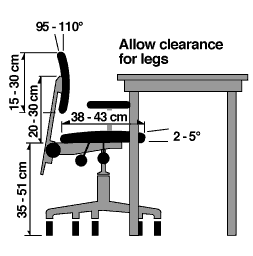
Ergonomic Chair
Why is finding the right chair so important?
Back to topInjuries resulting from sitting for long periods are a serious occupational health and safety problem. Sitting jobs require less muscular effort, but that does not exempt people from the injury risks usually associated with more physically demanding tasks. For example, clerks, electronic assembly-line employees, and data entry operators who work in a sitting position also suffer back pain, muscle tenderness, and aches. In fact, reports of varicose veins, stiff necks, and numbness in the legs are more common among seated employees than among those doing heavier tasks.
In addition, sedentary time has been found to be associated with health effects such as metabolic syndrome (including diabetes), heart disease, and poor mental health. These effects are not related to how active a person is physically.
See the OSH Answers “Working in a Sitting Position” for more information.
What do you need to know about selecting a good ergonomic chair?
Back to topWith the ergonomics approach, sitting is viewed as a specific, specialized activity which is influenced by the way that a sitting person interacts with the working environment.
Several basic concepts should be considered:
- One chair does not fit everyone. The users' body dimensions must be considered when selecting a chair so that the chair does not strain one part of the body while fitting another.
- Collect data about the user's body height. The optimal seat height is about one quarter of the body height. This estimate is only a rule of thumb since the torso-to-leg ratio can vary widely.
- There is no chair suitable for every activity. For example, dentists require a different chair than do industrial workers or computer operators.
- Consider maintenance and repair costs. Check with the manufacturer for items to inspect for and how often inspection should be done.
What are the features of a good chair?
Back to topSome features are important for a good chair regardless of how you intend to use it:
- Adjustability - Check to see that seat height is adjustable.
- Seat height range - Check whether the seat height can be adjusted to the height recommended for the worker(s) who will use it. Alternate chairs may have to be selected for very short or tall workers. Ideally, a user should be able to sit with their feet on the floor or on a footrest without pressure on the underside of their thighs.
- Backrest - Check to see that the backrest is adjustable both vertically and in the frontward and backward direction and has a firm lumbar support, but does not create pressure points that restrict blood circulation. The backrest should be of appropriate height and width to provide support without restricting movement.
- Seat depth - Select the seats that suit the tallest and the shortest users. Users should be able to sit in the chair without pressure at the back of their knees, with their back supported by the backrest, and support through the buttocks and thighs.
- Seat width – The seat should be wide enough to allow users to have a comfortable and even pressure across the entire seat, and allow for some adjustments to their posture.
- Seat angle – Where the angle of the seat is adjustable, the seat should allow users to support their feet on the floor or footrest. Forward sloping seats should have a surface that has enough friction to prevent the user from sliding out of the chair or placing too much weight on their feet.
- Seat surface – The seat surface should be comfortable, usually made of breathable materials that minimize heat and moisture buildup. In some workplaces, such as healthcare or laboratories where infection control is a concern, other materials may be more appropriate.
- Armrests – armrests should provide support and evenly support the arms. The rests should be adjustable both for height and width (distance from the seat). In other situations, armrests may not be helpful if they prevent a person from sitting close enough to the desk and keyboard. Adjust or remove armrests, as needed.
- Stability - Check for the stability of the chair; a five-point base is recommended.
Other features to consider
- See if the selected chair has features that will help someone do their job better. Arm rests with adjustable heights are good for computer operators. Wider or narrower arm rests may also be required depending on the worker's dimensions and tasks they do.
- See if the selected chair has features that will make doing a job more difficult. An example may be that someone may be using a chair with casters or wheels when a stable and stationary work position would be better. If chairs with casters are needed, choose ones that match the type of flooring you have (e.g., hard casters for carpeting or soft casters for hard floors). Determine if there is a need to have brakes on the casters.
- The user should be able to operate the controls from a seated position where practical, and be logical in their placement and function.
Who should pick out the chair?
Back to topPersonal preference is essential to the process of selecting a chair.
- After some suitable chairs have been identified, allow the person who will use the chair most to try out the chair in a real work situation. It is especially useful to obtain several sample chairs for a trial comparison by those who will be using them.
- Make sure that the chair meets the needs of the workers and their jobs before any final selection is made.
Can a chair solve all of the ergonomic problems of working in a sitting position?
Back to topA well-designed chair allows the user to sit in a balanced position. Buying an ergonomic chair is a good beginning but it may not bring the benefits expected. It is still important to sit properly.
Also, remember that the chair is only one of the components to be considered in workstation design. All the elements such as the chair, footrest (if needed), work surface, document holders, task lighting and so on need to have flexibility and adjustability to be "designed in".
For more information about selecting and adjusting an ergonomic chair please visit the OSH Answers document How to Adjust Office Chairs.
In addition, workers should be made aware of the health hazards of prolonged sitting and give recommendations on what a worker in a given workplace can do to improve their working position. Employees need to know how to adjust the workstation to fit their individual needs for specific tasks. They also must know how to readjust the workstation throughout the day to relieve muscular tension.
Emphasize the importance of “rest” periods for their health and explain the importance of “active” rest. For example, a worker's duties can include opportunities to stand, walk, or otherwise move around in order to reduce the amount of time spent sitting. Where practical, jobs should incorporate "activity breaks" such as work-related tasks away from the desk or simple exercises which employees can carry out on the worksite.
- Fact sheet last revised: 2021-01-07